# Managing clients
> Add client brands, switch between them, and understand what is shared across your account and what stays separate per client.
Source: https://getintel.ai/docs/agencies/managing-clients/
One GetIntel account can hold several brands. For an [agency](/solutions/agencies/), each brand is a client with its own data, and everything in the app follows the brand you have selected.
## Add a client
1. Open the brand switcher in the header and choose **+ Add client**, or go to **Settings → Clients → + Add client**.
2. **Enter Your Website.** GetIntel reads the site to fill in the next steps.
3. **Your Product.** Check the product name and what it does.
4. **Target Audience.** Job title, industries, company size and geography.
5. **Pain Points & Messaging.** The problems the product solves and its key value propositions.
GetIntel then sets up the client's competitors, buyer questions and topics, and runs its first scan.
## Switch between clients
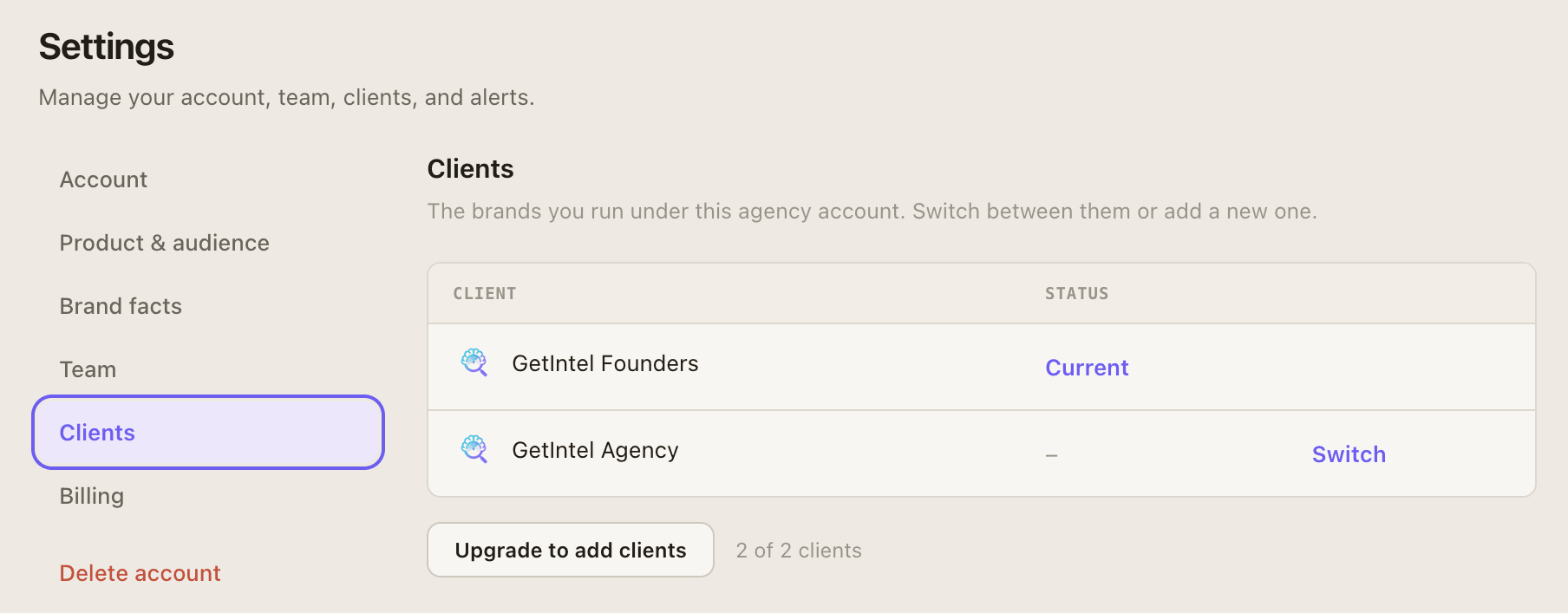
Pick a client in the header switcher, or choose **Switch** next to it in **Settings → Clients**. The app reloads with every page scoped to that client.
[](/product/clients.png)
The switcher shows how many clients your plan allows ("X of Y clients"). When you reach the limit, **Add client** becomes **Upgrade to add clients**.
## What is separate and what is shared
| Separate per client | Shared across the account |
| --- | --- |
| Website and product profile | Team members |
| Competitors, buyer questions and topics | Billing and plan |
| Scores, answers, sources and tasks | The [Looker Studio](/docs/looker-studio/) key: one key covers every client, and each report picks its client |
| [MCP tokens](/docs/mcp/connect/): a token only sees the client it was created for | |