A new dashboard doesn't automatically create a trustworthy new baseline. If you switch AI visibility platforms without preserving the old trendline, a change in citation rate may reflect a different prompt set, engine mix, sampling method, or scoring model rather than a real change in visibility. The first move in an AI visibility tool migration checklist is therefore not account setup. It's exporting historical trend data from the current tool.
Treat the migration as a measurement-continuity project, not a software switch. Preserve the archive, recreate the probes buyers use, test both platforms during an overlap period, reconnect Google Search Console, Slack, and Zapier, re-onboard the team, and define clear cutover and rollback controls. Then stabilize governance around prompt ownership, access, reporting, and engine-level quality checks.
That discipline matters as AI answer surfaces expand. Google said AI Overviews began rolling out to more than 100 countries and territories on October 28, 2024, after opening to all U.S. users on May 14, 2024, as documented in Google's AI Overviews rollout announcement. Teams supporting communities, customers, or buyers with AI support need visibility data they can trust, not another disconnected dashboard.
Table of Contents
- 1. Export and Archive Historical Trend Data from Your Current Tool
- Build an archive someone else can use
- 2. Validate Data Accuracy with Overlapping Period Testing
- Diagnose disagreement before declaring a winner
- 3. Map and Reconfigure Google Search Console Integration
- Match search queries to buyer prompts
- 4. Reconfigure Slack and Zapier Workflow Integrations
- Test the entire chain
- 5. Audit and Recreate Custom Prompts and Buyer Intent Questions
- Prioritize prompts by business value
- 6. Re-onboard Team Members and Update Role-Based Access Controls
- Train by job, not by feature list
- 7. Establish a Parallel Reporting Cadence During Transition
- Report to decision-makers differently
- 8. Document the Tool Switchover Timeline and Establish a Communication Plan
- Define the decision gates
- 8-Point AI Visibility Migration Checklist
- Make the New Baseline Earn Your Trust
- Run a formal post-migration review
1. Export and Archive Historical Trend Data from Your Current Tool
Reviewed 19 September 2026. Migration starts with the evidence you already own, which is why exporting historical trend data comes first. Export historical Answer Rate, citation counts, Share of Voice, Average Citation Rank, prompt-level results, competitor comparisons, engine breakdowns, and annotations for major content or product changes. Preserve original timestamps and metric definitions. Without that context, later differences may reflect changed measurement rather than changed visibility.
Export CSV or JSON files, then create an index covering the export date, period, brand or domain, prompt set, engines, filters, and scoring fields. Keep raw files untouched. Use a separate copy for normalization, and compare interface exports with API output where available. That comparison can expose missing fields, pagination limits, or differences between displayed and downloadable data.
Practical rule: Export first, compare schemas second, and cancel the old platform last.
Build an archive someone else can use
Test exports across multiple date ranges. Check whether repeated downloads return the same records, then document field names, data types, timezone conventions, null values, engine labels, and citation definitions. Clarify whether each citation represents a URL, domain, or brand mention. Parse the files into a spreadsheet or visualization before using them for migration analysis.
Google Search Console needs a separate retention plan. Its performance data is available within a rolling 16-month window, while bulk export is forward-looking rather than a historical backfill, according to Google's Search Console bulk data export documentation. Connect the new reporting destination before older records age out.
Use consistent filenames and include metadata in every archive. Retain the old platform's database backup or raw exports as a recovery fallback after cutover. For a practical reference covering prompts, categories, reports, and historical results, review this guide to switching from Semrush to an AI visibility tool.
The archive should support both analysis and rollback. A later score comparison is only credible when the underlying prompts, engines, definitions, and timestamps remain available for inspection.

2. Validate Data Accuracy with Overlapping Period Testing
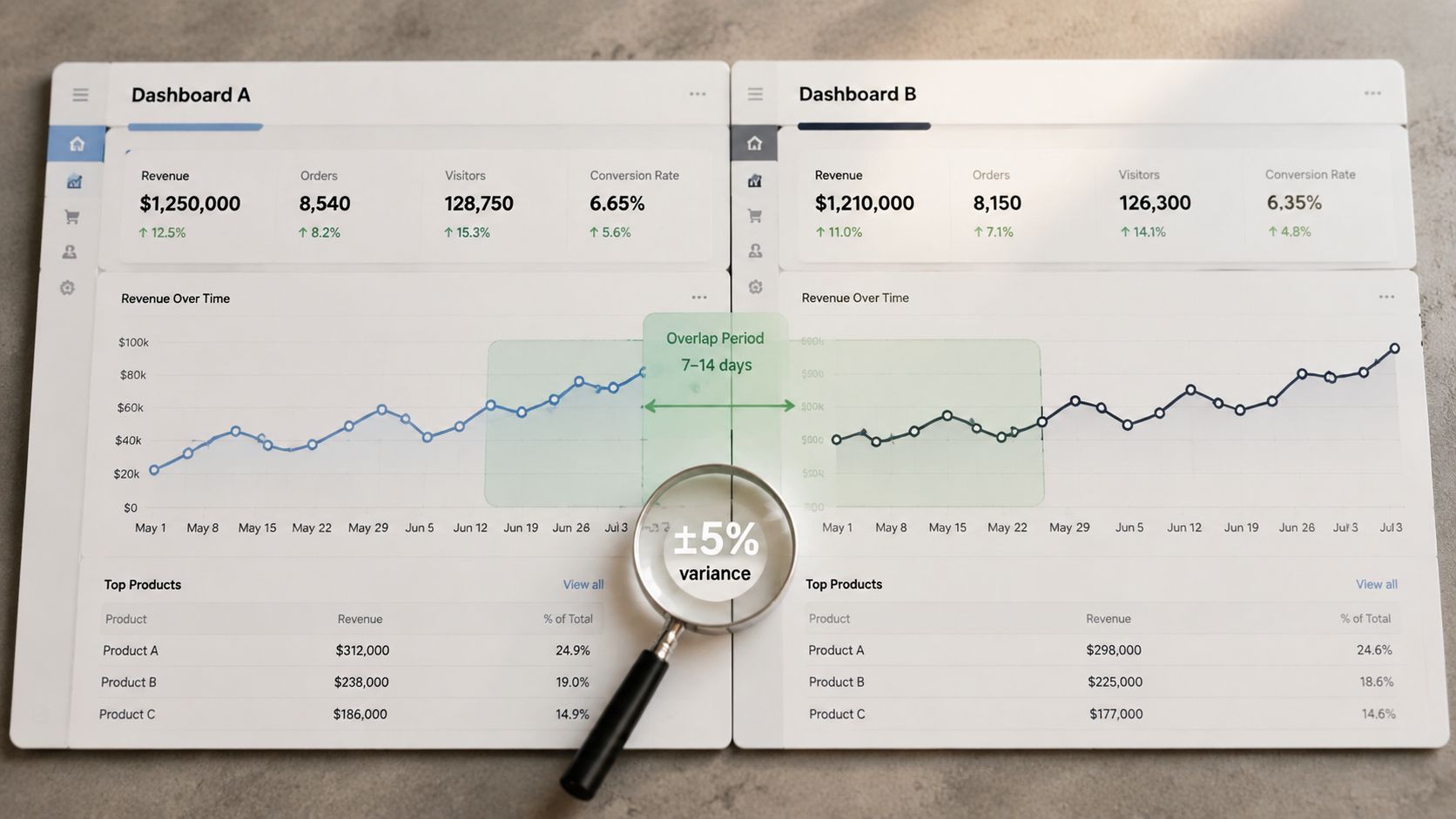
Run the old and new tools at the same time before making the new platform authoritative. The exact overlap length should reflect your reporting cycle and engine volatility, but the test must be long enough to expose configuration problems rather than relying on one afternoon of matching results.
Start with a fixed sample of buyer prompts across your major categories. Include pricing, alternatives, “best of,” comparison, implementation, and problem-oriented questions where relevant. Preserve the exact wording, capitalization, location settings, device settings, engine selection, competitor filters, and answer-capture method. Small changes can produce different citations even when both tools are working correctly.
Create a side-by-side validation sheet with one row per prompt and fields for the old result, new result, cited domains, cited URLs, mention position, engine, timestamp, and variance notes. Google's reporting documentation explains that the Search Console interface exports up to 1,000 rows, while the Search Analytics API can return up to 50,000 rows per day per site and search type, with pagination needed beyond the default result set. That limitation is a useful reminder to test extraction logic rather than assuming the visible dashboard is complete. See Google's Search Analytics data guide for the mechanics.
Diagnose disagreement before declaring a winner
A difference isn't automatically an error. One tool may capture live interface answers while another uses an API, apply different duplicate-citation rules, or monitor a different engine or country. What matters is whether the team can explain the variance and whether trend direction remains useful.
Use a tolerance agreed in advance, flag outliers automatically, and ask someone who isn't invested in either platform to review the results. If counts diverge materially, check prompt normalization, crawl timing, filters, engine coverage, answer versions, and API authentication before proceeding. The analysis of misleading AI visibility scores is useful context when deciding which parts of a score deserve scrutiny.
3. Map and Reconfigure Google Search Console Integration
Reconnect Google Search Console as a deliberate data-mapping exercise. A successful authorization only proves that the new tool can access the property. It doesn't prove that the right property, query dimensions, country filters, devices, date ranges, and landing-page fields are reaching the right reports.
List every GSC property used by the old platform, including domain properties and URL-prefix properties. Confirm ownership or the access level required by the new vendor, then connect each property individually. If several brands, subdomains, or regional sites share an account, apply explicit property-level filters so metrics don't blend across businesses.
Match search queries to buyer prompts
GSC queries and AI probes rarely use identical language. Build a mapping layer that connects organic query clusters to the closest buyer questions. For example, a GSC query about product comparison may map to an AI prompt asking for the best alternatives. Keep the original query and the mapped prompt in separate fields so analysts can distinguish observed search behavior from editorial interpretation.
Check freshness, row counts, clicks, impressions, click-through rate, position, country, device, and page dimensions. Use the new platform's daily refresh only after comparing its output with a direct GSC export. Google states that the Search Console API supports performance-report downloads, while bulk export sends daily data to BigQuery and doesn't backfill earlier periods, as explained in Google's Search Console data delivery documentation.
A good integration makes organic and AI evidence comparable without pretending they're the same metric. Search Console shows how people interact with Google Search, while an AI visibility tool shows how answer engines mention brands and sources. Review both alongside content changes, prompt-level citation movement, and engine-specific results.
4. Reconfigure Slack and Zapier Workflow Integrations
A migration is incomplete when the dashboard works but the alerts don't. Inventory every Slack notification, webhook, Zapier workflow, email rule, ticket action, sales notification, and content-review trigger connected to the old platform. Record the trigger condition, threshold, message template, destination channel, API field, owner, and intended action.
Export configuration details before disconnecting anything. Screenshots can preserve settings that aren't available in a formal export, especially for webhook payloads and conditional branches. Then rebuild the workflow against the new tool instead of assuming that an existing authorization or field name will carry over.
Test the entire chain
For Slack, use a staging or low-traffic channel first. Confirm that the new platform can send the event, that the webhook accepts it, that the message contains the expected prompt and citation details, and that the channel routing is correct. A notification that arrives without the prompt, engine, or cited source may technically succeed while remaining operationally useless.
For Zapier, re-authenticate the connection, recreate the trigger, inspect field mappings, and run a test event through the full trigger-action chain. Zapier's Google Search Console to Slack alert templates illustrate why these workflows need more than a simple switch. The source event, message format, and destination action are all linked.
Start with high-signal alerts while the new baseline settles. Don't flood the team with every fluctuation. Define which alerts require action, which are informational, who owns the response, and where the resulting task should live. Document the workflow in a shared knowledge base with screenshots and a plain-language explanation of intent.
5. Audit and Recreate Custom Prompts and Buyer Intent Questions
Prompt parity is the center of trend continuity. Export every custom prompt, keyword set, question template, category tag, persona label, engine assignment, and instruction from the old tool. Preserve exact wording before editing anything. A cleaner prompt set may be strategically better, but it creates a measurement break if the old and new versions aren't tracked separately.
Create a master prompt register with fields for prompt text, business category, buyer stage, persona, engine coverage, owner, last tested date, performance notes, and migration status. Mark duplicates, vague wording, outdated product references, competitor names, and prompts that no longer represent a real buying decision.
Prioritize prompts by business value
Recreate the highest-value buyer questions first. Pricing, alternatives, comparisons, best-of questions, and product-fit prompts usually deserve priority because their answers can influence active evaluation. Keep awareness prompts in the program, but don't let a large low-intent set delay validation of the questions that sales and product marketing care about most.
Have two people review the register independently. One reviewer should focus on language and buyer intent, while the other checks categorization, engine coverage, and duplicate handling. Then test each priority prompt in both tools during the overlap period.

Use the new platform's tags or custom fields for owners, priority, product area, and review status. Record every wording change in a prompt update log, including why the change was made. Otherwise, a later improvement or decline may reflect prompt editing rather than a genuine shift in AI visibility.
Keep a fixed core set for longitudinal reporting and a separate experimental set for new questions. That distinction lets the team expand coverage without constantly changing the baseline.
6. Re-onboard Team Members and Update Role-Based Access Controls
People don't adopt a migration because they received login credentials. They adopt it when the new platform fits their daily decisions. Map current users, workspaces, brands, reports, prompt ownership, and data restrictions before provisioning accounts. Then translate those needs into role-based access such as Admin, Editor, Analyst, and Viewer.
Review whether the new tool supports SSO, audit logs, team-level restrictions, client separation, export permissions, and access revocation. Don't grant everyone administrative rights to avoid a setup conversation. Broad access can expose client data, allow accidental prompt edits, or make it impossible to identify who changed a report.
Train by job, not by feature list
Marketing users need to find citation gaps, interpret prompt movement, and connect changes to content work. Analysts need to understand filters, exports, methodology, and variance. Executives usually need stable trend views and clear explanations, not every configuration option. Customer-facing teams need a safe way to access approved reports without editing the underlying measurement set.
Assign a super user to work in the new platform during the overlap. That person should document renamed fields, missing capabilities, report differences, common errors, and the fastest route to routine tasks. Department-level tool champions can then answer questions without forcing every issue through the migration lead.
Use small training sessions with hands-on exercises. Ask each user to complete a real task, such as locating a cited competitor, exporting a prompt report, acknowledging an alert, or opening a source-level gap. Provide a short FAQ covering login, prompt ownership, report locations, access requests, and escalation.
Expect a temporary productivity dip and tell leadership why it's happening. A realistic ramp is easier to manage than pretending the interface change has no operational cost.
7. Establish a Parallel Reporting Cadence During Transition
Parallel reporting protects stakeholder confidence while the measurement model changes. For each reporting cycle, show the old and new values side by side, then explain the variance in operational language. Don't present a new score as a direct continuation unless the prompt set, engine coverage, sampling, citation rules, and calculation method are comparable.
A migration report should include:
- Old-tool result: Preserve the metric name and definition exactly as the legacy platform displayed it.
- New-tool result: Record the new value, scope, engine coverage, and refresh context.
- Variance: Show the absolute difference and percentage difference only when the underlying values support a meaningful comparison.
- Explanation: Identify methodology, coverage, filter, or configuration differences.
- Trend direction: State whether both tools show movement up, down, or flat.
Report to decision-makers differently
Executives may care about competitive Share of Voice and whether the brand is being recommended. Product marketing may care about comparison and alternative prompts. Content teams may need cited URLs, missing source types, and page-level recommendations. Give each group the same underlying evidence with a view that supports its decisions.
Schedule a short review with key stakeholders after the first parallel report. Invite questions about what changed and what didn't. If the tools disagree beyond the agreed tolerance, investigate before using the new data in client, board, or revenue reporting.
Archive every parallel report. It becomes the audit trail for later questions, especially when someone asks why the trendline appears to jump on the cutover date. Send a clear cutover announcement only after the methodology, integrations, and access model have been validated.
8. Document the Tool Switchover Timeline and Establish a Communication Plan
Treat the migration as a measurement-continuity project, not a software switch. Assign one accountable owner, list named contributors, and define go or no-go criteria in a version-controlled workspace such as Notion, Google Docs, Asana, or another system the team already uses. Keep the document current so slippage and unresolved dependencies remain visible.
Track historical export, schema reconciliation, prompt recreation, overlap testing, GSC connection, Slack and Zapier rewiring, access provisioning, training, parallel reporting, cutover, stabilization, and old-tool sunset. Assign an owner to every task, including license cancellation and archive retention. Record the switchover date, validation window, stabilization period, and communication checkpoints.
Define the decision gates
Cut over only when the team confirms:
- Data validation passes: Priority prompts return explainable results across both tools, with comparable engines, filters, and question wording.
- Integrations are live: GSC, Slack, Zapier, exports, and downstream reports pass end-to-end tests.
- Access is ready: Each user can log in and has the minimum permissions required for the role.
- Rollback is approved: IT and the migration lead agree on the trigger, procedure, and authority to revert.
Set a communication protocol that names recipients, channels, owners, and response times after a material change. Use frequent status checks during cutover, then reduce them during routine stabilization. State what changes in reporting, which baseline remains authoritative, and where teams should report discrepancies.
Make rollback triggers concrete. Inconsistent new-tool data, a critical integration going offline, or lost access to an important report should pause the cutover or activate reversion. Keep the old platform available until the validation window closes. During stabilization, monitor data health, alerts, access, and report delivery daily.
Archive the final timeline, status log, decision records, and rollback outcome. That record shows which estimates were realistic, which dependencies caused delays, and which checks caught problems before they reached stakeholders. It also gives the next migration a usable operating baseline instead of relying on memory.
8-Point AI Visibility Migration Checklist
Eight steps take a brand from one AI visibility tool to another without losing the baseline that makes before-and-after comparable.
| Step | 🔄 Implementation complexity | ⚡ Resource requirements & speed | 📊 Expected outcomes (⭐ quality) | 💡 Ideal use cases | ⭐ Key advantages |
|---|---|---|---|---|---|
| Export and Archive Historical Trend Data from Current Tool | 🔄🔄 Medium, depends on export support and normalization effort | ⚡ Moderate speed; high storage/processing needs for large histories | 📊 Preserves baseline for comparisons; high fidelity historical continuity (⭐⭐⭐⭐) | Teams needing audit-ready baselines before cutover | ⭐ Preserves institutional memory; enables side-by-side validation |
| Validate Data Accuracy via Overlapping Period Testing | 🔄🔄🔄 High, requires parallel setup and method alignment | ⚡ Slower (7–14 days); needs dual licenses, analyst time | 📊 Confirms measurement alignment and uncovers systematic bias (⭐⭐⭐⭐⭐) | Critical when new tool methodology may differ from legacy | ⭐ Detects discrepancies early; builds stakeholder confidence |
| Map and Re-configure Google Search Console Integration | 🔄🔄 Medium, technical (OAuth) and mapping work | ⚡ Moderate speed; needs verified GSC access and mapping effort | 📊 Unified organic + AI visibility view; improved correlation insights (⭐⭐⭐⭐) | Organizations correlating SEO with AI citations | ⭐ Enables cross-channel attribution and content-gap ID |
| Reconfigure Slack and Zapier Workflow Integrations | 🔄🔄 Medium, many connectors and payload mappings | ⚡ Fast to moderate; requires re-authentication and testing | 📊 Restored operational alerts and automation continuity (⭐⭐⭐) | Teams relying on alerts and automated task creation | ⭐ Minimizes missed alerts; automates downstream actions |
| Audit and Recreate Custom Prompts and Buyer Intent Questions | 🔄🔄🔄 High, manual audit, normalization, and bulk import | ⚡ Time-intensive up front; accelerates monitoring once complete | 📊 Maintains prompt-level trend continuity and comparability (⭐⭐⭐⭐) | Organizations tracking many custom buyer prompts or personas | ⭐ Preserves measurement consistency; reduces future variance |
| Re-onboard Team Members and Update Role-Based Access Controls | 🔄🔄 Medium, coordination with IT and SSO setup | ⚡ Moderate time; training overhead but quick access once done | 📊 Restores team access, security, and accountability (⭐⭐⭐) | Companies with multiple users, compliance needs, or agencies | ⭐ Ensures correct permissions, audit trails, and SSO security |
| Establish a Parallel Reporting Cadence During Transition | 🔄🔄 Medium, reporting templates and cadence to maintain | ⚡ Adds ongoing reporting overhead during overlap; short-term | 📊 Transparent variance tracking; preserves stakeholder trust (⭐⭐⭐⭐) | Executive reporting during migrations or high-impact changes | ⭐ Reduces confusion; documents transition rationale |
| Document Tool Switchover Timeline and Establish Communication Plan | 🔄🔄 Medium, planning and stakeholder coordination | ⚡ Planning is time-consuming but enables smoother execution | 📊 Clear milestones, go/no-go criteria, and risk mitigation (⭐⭐⭐) | Any migration with multiple teams and external dependencies | ⭐ Provides accountability, reduces surprises, and enables rollback decisions |
Make the New Baseline Earn Your Trust
The migration ends when the new tool becomes operationally dependable, not when the old subscription is canceled. Keep the historical archive, preserve the raw exports, and document which metrics can be compared directly and which require a methodological break. The team should always be able to answer whether a visibility change reflects buyer behavior, content work, engine behavior, or a measurement change.
Monitor Answer Rate, Share of Voice, Average Citation Rank, cited domains, cited URLs, and prompt-level results across engines. A useful dashboard separates brand mentions from actual citations and shows the engine, prompt, answer capture date, cited source, and competitor context. Google's AI Overviews rollout makes this separation more important because exposure is uneven across query types. Independent analyses estimated AI Overviews on about 12.95% of U.S. queries on average, while Ahrefs found coverage on 9.46% of all keywords, 16% of U.S. desktop searches, and more than 54.61% of searches by volume, as summarized in the Google rollout reference. The practical implication is to measure both broad keyword coverage and volume-weighted exposure, then prioritize high-intent informational prompts where citations can influence evaluation.
Don't reduce AI governance to publishing an llms.txt file. The 2025 Web Almanac SEO analysis reported desktop adoption at 2.13% of sites and mobile adoption at 2.10%, while 39.6% of existing files were plugin stubs, according to the analysis of llms.txt adoption. Treat the file as one control alongside schema markup, entity cleanup, source-friendly content, crawler access, and citation monitoring.
Run a formal post-migration review
Review the migration after stabilization with representatives from marketing, SEO, engineering, analytics, sales, and IT. Confirm that:
- Historical exports remain readable and stored in an approved location.
- Core prompts have stable ownership and documented wording.
- GSC data flows into the correct property and reporting view.
- Slack, Zapier, webhooks, and API exports deliver expected events.
- Access reviews and audit logs work as intended.
- Engine-level answer captures can be reproduced for priority prompts.
- Rollback steps remain executable while the old tool is still available.
- The old platform is retired only after the agreed validation window.
The measurement layer is changing quickly. Google added AI Overviews and AI Mode reporting in Search Console in June 2026, GA4 began surfacing AI assistant traffic around May 2026, and Bing introduced AI visibility fields such as Topics and Citation Share in June 2026. Preserve those first-party baselines before changing systems, because future comparisons are only as useful as the history you saved.
Governance should continue after launch. Schedule recurring prompt reviews, access audits, integration checks, citation sampling, and reporting-methodology reviews. Record changes against the metric they're meant to move, Answer Rate, Share of Voice, or Average Citation Rank, so the team can connect a shipped fix with movement in the appropriate area.
GetIntel can fit this operating model when a team needs daily visibility tracking, buyer-prompt probes, citation-source intelligence, competitor benchmarks, GSC, Slack, Zapier, CSV exports, and trend histories in one system. Whether you choose it or another platform, make the new baseline prove itself through preserved history, prompt parity, engine-level QA, and reliable workflows.
GetIntel measures visibility across ChatGPT, Perplexity, Gemini, and Google AI Overviews, while preserving prompt-level results, citation sources, competitor benchmarks, and trend histories for migration analysis. Visit GetIntel to evaluate a platform that connects AI visibility measurement with reviewable fixes and operational integrations.