No, Zapier doesn't have a native, prebuilt workflow for tracking AI brand visibility in ChatGPT and Perplexity. We asked all five major AI answer engines directly, and every one agreed: Zapier ships generic Perplexity and ChatGPT integrations (chat completion, search, RSS-to-email), but nothing purpose-built for "is my brand showing up on this buyer prompt?" You can build that yourself. Here's exactly what it takes, and where it breaks.
Why check Zapier before buying a dedicated tool?
Reviewed 19 September 2026. Check Zapier before buying a dedicated tool if you are a growth lead or solo founder already running most of your stack through it, the instinct makes sense: before paying for a dedicated AI visibility tool, check whether the automation platform you already pay for can just do this. On August 1, 2026, we ran the exact question, "Does zapier.com have any workflow that helps SaaS companies track and improve their brand visibility in ChatGPT and Perplexity responses?", through ChatGPT, Perplexity, Gemini, Google AI Overview, and Google AI Mode, the same five engines GetIntel probes daily for buyer-intent questions. The answers were unusually consistent for a topic this new.
Zapier ships new integrations constantly, so we're treating this as a live answer, not a permanent one: we'll re-run this exact prompt across all five engines quarterly and update this page if a dedicated workflow ever ships.
What did all five AI engines actually say?
All five AI engines gave the same core answer, phrased differently: Zapier moves visibility data around, it does not measure visibility.
- ChatGPT: "No, Zapier does not appear to offer a dedicated, prebuilt workflow specifically for tracking and improving a SaaS company's brand visibility in ChatGPT and Perplexity responses. However, Zapier provides the building blocks to create one yourself."
- Perplexity: confirmed Zapier has documented Perplexity integrations you could repurpose, but couldn't point to "a single, definitive Zapier template specifically branded for brand visibility in ChatGPT and Perplexity."
- Gemini: went further, naming two dedicated AI-visibility platforms that have built their own Zapier integrations on top of the platform, rather than Zapier building brand-monitoring natively.
- Google AI Overview and Google AI Mode: both independently described this as a "build it yourself" gap, not a missing feature that's coming soon.
That's a rare level of agreement across five different models, and it's worth taking at face value: as of today, Zapier is infrastructure you can build a tracker on top of. It isn't a tracker.
What does Zapier's actual Perplexity integration page show?
Zapier's actual Perplexity integration is a search action, not a visibility tracker. The integration page is screenshotted below rather than described secondhand:
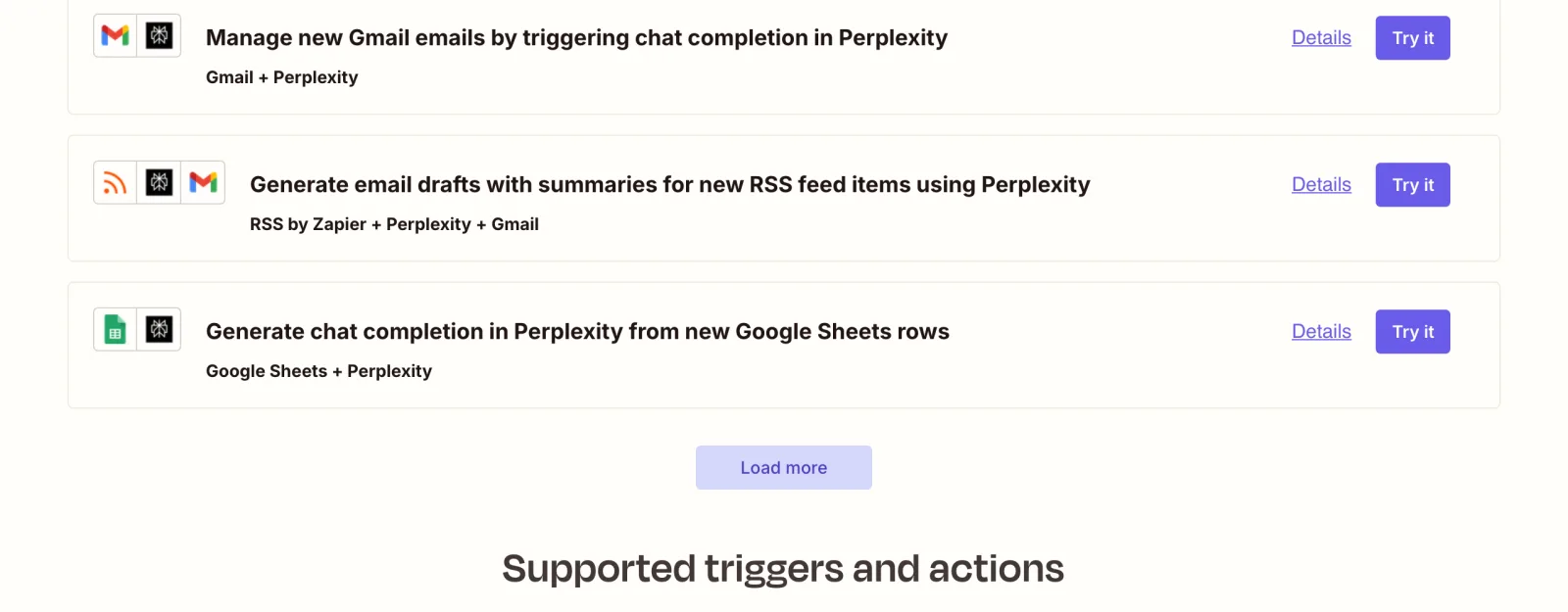
Every template on that page is a generic productivity workflow: draft an email summary from an RSS feed, log a chat completion from a Google Sheets row, trigger a completion when a new Gmail lands. The two supported actions are Chat Completion (generate a model response) and Search (return ranked results), building blocks, not a "check if my brand was mentioned" trigger. There's no template, no trigger, and no action anywhere on the page that references brand mentions, citations, or competitor tracking. If a workflow like that existed, it would show up here first.
How do you build this yourself in Zapier?
Five steps, one engine, no fix generation: that's the ceiling of the DIY version. Every engine converged on the same shape:
- Schedule trigger: a weekly or daily run via Schedule by Zapier.
- Prompt source: a Google Sheet, Airtable base, or Notion database holding your real buyer-intent prompts ("best CRM for B2B SaaS," not generic keywords).
- Query the engine: Zapier's Perplexity "Search" action (or the ChatGPT/OpenAI chat-completion action) sends each prompt.
- Parse the response: a Formatter or Code step checks the returned text for your brand name and your competitors' names.
- Log and alert: push results to Google Sheets or Airtable for a trend line, and route drops in mentions to Slack.
This is a real, workable pipeline for one engine (Perplexity, since Zapier has a native action for it). It's a meaningfully bigger lift than it looks once you try to extend it.
What step 4 actually looks like
The Perplexity Search action returns a single text blob, not structured mention data, so the parsing step has to do real work. A Zapier "Code by Zapier" step doing a case-insensitive substring check against your brand name and each competitor's name is the minimum viable version:
response.toLowerCase().includes("yourbrand")
It's brittle in an obvious way, a response that spells your brand slightly differently, or mentions it inside a URL rather than as a word, slips through silently. Catching that reliably means adding fuzzy matching or a second LLM call just to grade the first one's output, which is exactly the kind of scope creep that turns a "quick Zap" into an ongoing engineering project.
Where does the DIY version break?
The single-engine pipeline above is the easy 20%. Extending it to match what a dedicated tool covers out of the box is where the real cost shows up.
Engine coverage gaps
- No official ChatGPT interface access. ChatGPT's own answer flagged this directly: Zapier's OpenAI integration hits the API, not the consumer ChatGPT interface buyers actually see, and those two can return different citations. Anything claiming to monitor the real ChatGPT UI through Zapier is relying on unofficial browser automation, which is fragile and can violate OpenAI's terms of service.
- No Claude or Gemini coverage without stitching in more tools. Zapier has no native Claude action at all, and Gemini support is thin. Covering all the engines that matter (see our AI Brand Visibility Tracking guide) means bolting three or four separate automation chains together, each with its own parsing logic to maintain.
Operational gaps
- No historical trend or verification loop. A Zap logs a row. It doesn't tell you whether a fix you shipped last week actually closed the gap, or whether a competitor's mention rate is climbing while yours flattens.
- Maintenance cost compounds. Every prompt-list update, every new competitor, every engine-response format change is a manual edit to your Zap's parsing step. This is the same operational tax the ship-the-fix workflow piece covers from the other direction: automating the finding is only half the problem if nothing automates the fixing.
What mistakes do teams make trying this?
- Testing with one or two prompts and calling it "coverage." A single Perplexity query about your category tells you almost nothing about buyer-intent visibility. You need a real prompt set across the actual questions buyers ask, run consistently, not a one-off spot check.
- Treating a logged mention as the finish line. Knowing you were skipped on a prompt is the easy 80%. The harder, more valuable part is shipping a fix (an
llms.txtupdate, a Schema.org block, a counter-article) and re-checking whether it actually moved the needle. - Scraping the ChatGPT UI to work around the API gap. It's tempting once you notice the API and interface disagree, but it's fragile automation built on an unsupported surface, not a durable pipeline.
When is a dedicated tool worth it instead?
Switch from DIY to a dedicated tool the moment you need more than one engine, daily refresh, or an actual fix instead of a logged row. If your buyer prompts span more than one engine, need daily refresh, or you want the actual fix (not just the finding), a dedicated AI visibility tool removes the maintenance burden the DIY route creates. GetIntel runs daily probes across ChatGPT, Perplexity, Gemini, Google AI Overviews, and Claude, and on the Pro plan it pushes results straight into Slack, Zapier, and Webhooks, so Zapier still fits into the workflow, just as the delivery layer instead of the thing doing the probing and parsing. See the AI visibility tracker for how the daily scan works, or the full GEO tools roundup if you're comparing more than one option.
DIY vs. dedicated tool, side by side
The trade-off in one line: Zapier is a workflow engine, not a research product, and it was never trying to be one. The two approaches compare like this:
| DIY Zapier tracker | Dedicated AI visibility tool | |
|---|---|---|
| Engines covered natively | Perplexity (1 native action) | ChatGPT, Perplexity, Gemini, Google AI Overviews, Claude |
| ChatGPT interface accuracy | Unofficial/API-only, fragile | Reads what buyers actually see |
| Setup effort | Build and maintain 4-5 Zap steps per engine | Connect and go |
| Fix generation | None, logging only | Drafted llms.txt, schema, counter-content |
| Historical trend + re-check | Manual, if you build it | Built in |
| Where Zapier fits | The whole pipeline | Delivery layer only (Slack/Zapier/Webhooks) |
That division of labor (a dedicated tool for the probing and fix generation, Zapier for routing the output where your team already works) holds up better over time than trying to make general automation software do citation-detection work it wasn't built for.
For the same comparison against other tools in this category: GetIntel vs Otterly.ai.