
Reports
The client report — a branded PDF and a shareable link covering where a brand stands in AI answers, what changed, what shipped and what to fix. How to generate one, what each section holds, scheduling and sharing.
Reports turn what GetIntel tracks into a document you can send. Each one is built from answers already collected — nothing is scanned to make a report — and it carries the brand’s own logo and colour, not ours.
Every report arrives in two forms from the same build: a PDF to attach, and a link anyone can open without an account.
Generating a report
Section titled “Generating a report”-
Open Reports and choose Generate report.
-
Pick the period. A preset, or any start and end date. A single day is allowed and reports a baseline rather than a trend — see One day or a range.
-
Pick the market, if the brand tracks more than one.
-
Choose the sections. Each prints on its own page. Your choice is remembered per brand, so a client’s report keeps its shape every month.
-
Generate. It builds in the background — under a minute — and appears in the list when it’s ready. You can close the window and keep working.
What a report can carry
Section titled “What a report can carry”Fifteen sections, all optional:
| Section | What it holds |
|---|---|
| Where you stand | Visibility, share of voice, and every answer slot classified: named you, named rivals only, named nobody, no answer |
| What changed | The period against the one before it, charted day by day against the three brands AI names most |
| Engine by engine | How each engine answers, what that engine is, and where you land in its answers |
| Topics | Every topic with its change, the answers behind the number, and the rival named most. Click a topic to see its questions |
| The question set | Every tracked question and which engines named you. Click one to read what each engine actually said |
| Who AI names instead | Every brand the engines named, by share of voice and the questions they beat you on |
| The citation gap | The domains engines cite, and how much of it is yours |
| Your pages | Which of your own pages AI cites, and which are losing ground |
| What AI says by name | How accurately engines describe you, and how positively |
| The website | Crawlability and whether each engine can read the site |
| AI traffic | Crawler fetches and visitors from AI answers. Only appears when an analytics source is connected |
| What AI said | Unedited answers, with the full text and every source cited |
| What to fix | Open fixes across On-Page, Off-Page, UGC and Technical, each with the reason |
| What we shipped | The work completed in the period |
| What’s next | The ranked open work |
One day or a range
Section titled “One day or a range”A report knows which kind it is, and says so.
- A range with several scans charts movement day by day and compares against the period before it.
- A single day is a baseline. It compares against the scan before it instead, and names the questions that started or stopped naming you. It never implies a trend it can’t show.
Sharing a report
Section titled “Sharing a report”Choose Share link on any finished report. That mints a private URL — getintel.ai/r/… — that opens the full report in a browser with no login. The PDF downloads from the same link.
The shared page is interactive: a section menu, filters and search across the question set, sortable tables, and every AI answer readable in full with its sources.
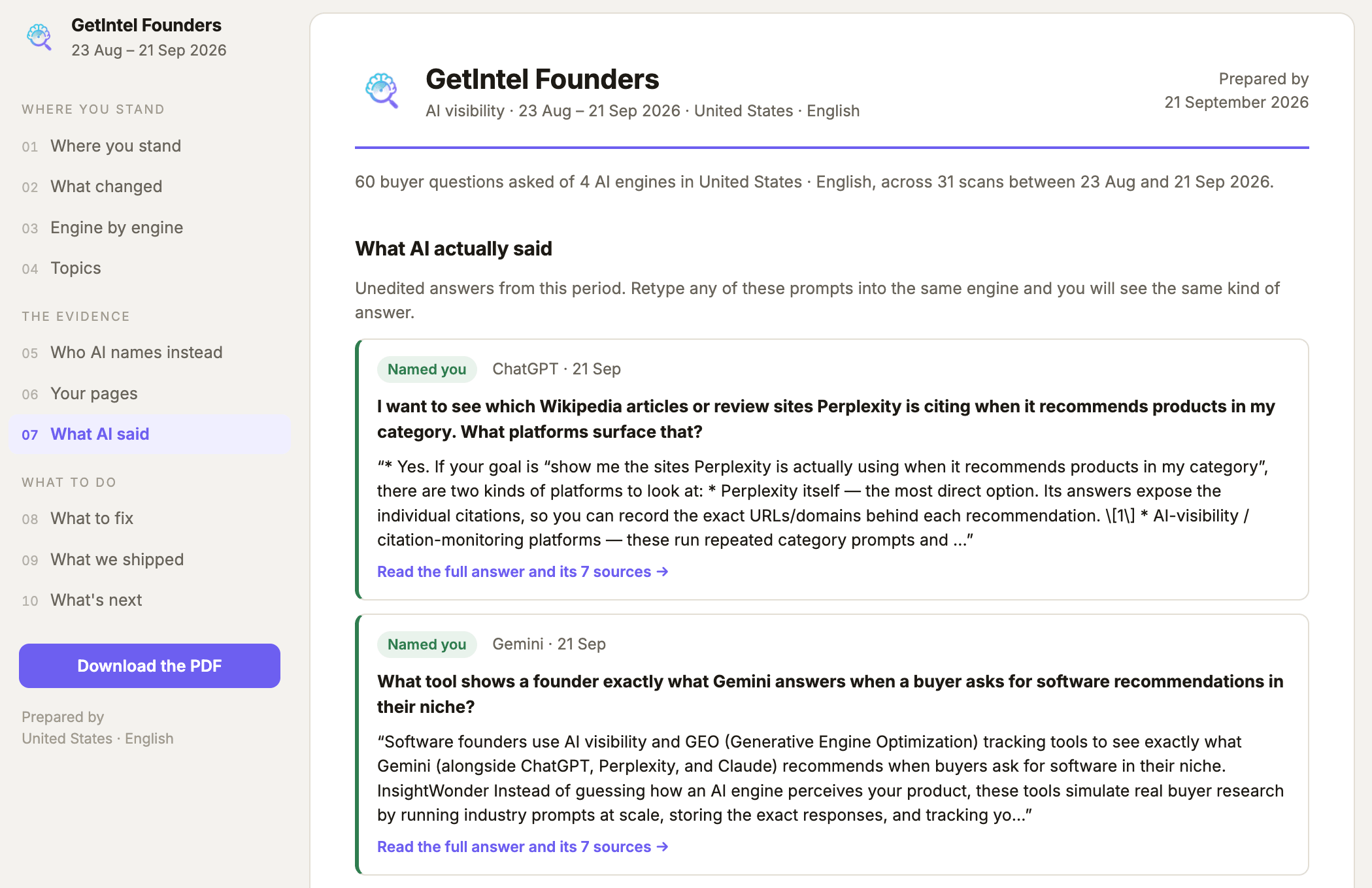
- It’s frozen. The page is stored when the report is built, so a link sent in July still shows July’s numbers however long it sits in an inbox.
- You can see whether it was opened — the report row shows the open count and when it was last opened, or “Link not opened yet”.
- Unshare revokes it. Every copy of the link stops working at once.
- Shared reports carry
noindex, so they never appear in search results.
Scheduling
Section titled “Scheduling”Open Generate report → Scheduled to have one built and emailed without anyone opening the app.
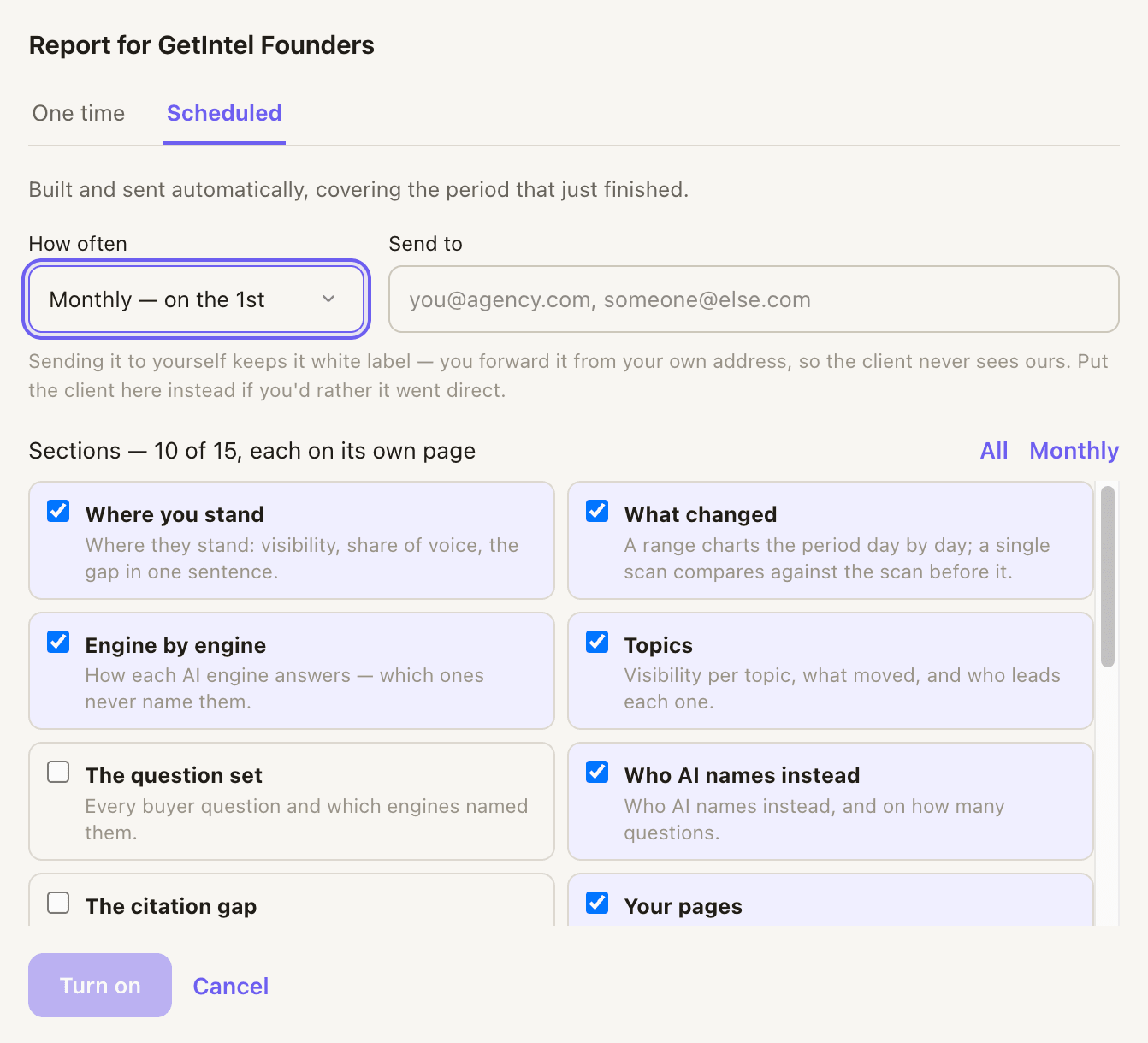
- Monthly on the 1st, or weekly on Monday, at 9am in your account’s timezone.
- It covers the period that just finished — run on 1 October, it reports September and is labelled September.
- Send to is where it goes. For agencies, sending it to yourself keeps it white label: you forward it from your own address, so the client never sees ours. Put the client’s address here instead if you’d rather it went direct.
The email leads with the numbers in plain language and attaches the PDF. It carries the client’s branding and nothing of GetIntel’s, so it can be forwarded without editing.
Branding
Section titled “Branding”Reports use each brand’s own logo and accent colour, set in Settings → Branding. The agency is named as “Prepared by” in the footer. See Managing clients.
Reporting on a company that isn’t a client
Section titled “Reporting on a company that isn’t a client”The same document can be built for a prospect you don’t work with yet — their number, who AI names instead, and what to fix — to send before a pitch. See Pitch reports.
Reports are on Pro and above. See Plans and billing.
Pitch reports are separate: every plan includes a monthly allowance of them, listed on Pitch reports.